6. Data Types and Variables
By Bernd Klein. Last modified: 12 Feb 2022.
Introduction
Have you programmed low-level languages like C, C++ or other similar programming languages? If so, you might think you know already enough about data types and variables. You know a lot, that's right, but not enough for Python. So it's worth to go on reading this chapter on data types and variables in Python. There are dodgy differences in the way Python and C deal with variables. There are integers, floating point numbers, strings, and many more, but things are not the same as in C or C++.
If you want to use lists or associative arrays in C e.g., you will have to construe the data type list or associative arrays from scratch, i.e., design memory structure and the allocation management. You will have to implement the necessary search and access methods as well. Python provides power data types like lists and associative arrays called "dict", as a genuine part of the language.
So, this chapter is worth reading both for beginners and for advanced programmers in other programming languages.

Live Python training

Enjoying this page? We offer live Python training courses covering the content of this site.
See our Python training courses
Variables
General Concept of Variables
This subchapter is especially intended for C, C++ and Java programmers, because the way these programming languages treat basic data types is different from the way Python does. Those who start learning Python as their first programming language may skip this and read the next subchapter.
So, what's a variable? As the name implies, a variable is something which can change. A variable is a way of referring to a memory location used by a computer program. In many programming languages a variable is a symbolic name for this physical location. This memory location contains values, like numbers, text or more complicated types. We can use this variable to tell the computer to save some data in this location or to retrieve some data from this location.
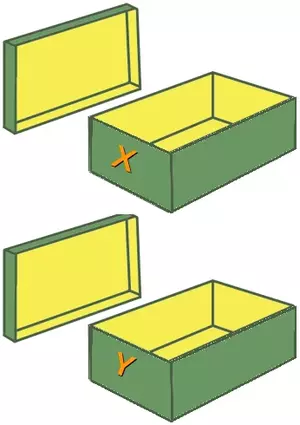
A variable can be seen as a container (or some say a pigeonhole) to store certain values. While the program is running, variables are accessed and sometimes changed, i.e., a new value will be assigned to a variable.
What we have said so far about variables best fits the way variables are implemented in C, C++ or Java. Variable names have to be declared in these languages before they can be used.
int x;
int y;
Such declarations make sure that the program reserves memory for two variables with the names x and y. The variable names stand for the memory location. It's like the two empty shoeboxes, which you can see in the picture above. These shoeboxes are labeled with x and y. Like the two shoeboxes, the memory is empty as well.
Putting values into the variables can be realized with assignments. The way you assign values to variables is nearly the same in all programming languages. In most cases, the equal "=" sign is used. The value on the right side will be saved in the variable name on the left side.
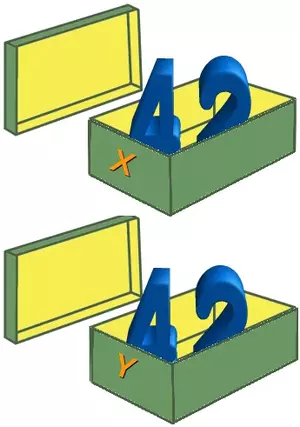
We will assign the value 42 to both variables and we can see that two numbers are physically saved in the memory, which correspond to the two shoeboxes in the following picture.
x = 42;
y = 42;
We think that it is easy to understand what happens. If we assign a new value to one of the variables, let's say the value 78 to y:
y = 78;
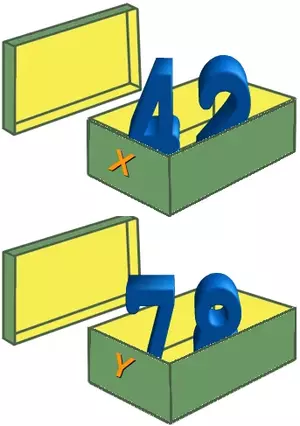
We have exchanged the content of the memory location of y.
We have seen now that in languages like C, C++ or Java every variable has and must have a unique data type. E.g., if a variable is of type integer, solely integers can be saved in the variable for the duration of the program. In those programming languages every variable has to be declared before it can be used. Declaring a variable means binding it to a data type.
Variables in Python
There is no declaration of variables required in Python, which makes it quite easy. It's not even possible to declare the variables. If there is need for a variable, you should think of a name and start using it as a variable.
Another remarkable aspect of Python: Not only the value of a variable may change during program execution, but the type as well. You can assign an integer value to a variable, use it as an integer for a while and then assign a string to the same variable. In the following line of code, we assign the value 42 to a variable:
i = 42
The equal "=" sign in the assignment shouldn't be seen as "is equal to". It should be "read" or interpreted as "is set to", meaning in our example "the variable i is set to 42". Now we will increase the value of this variable by 1:
i = i + 1
print(i)
OUTPUT:
43
As we have said above, the type of a variable can change during the execution of a script. Or, to be precise, a new object, which can be of any type, will be assigned to it. We illustrate this in our following example:
i = 42          # data type is implicitly set to integer
i = 42 + 0.11       # data type is changed to float
i = "forty"     # and now it will be a string
When Python executes an assignment like "i = 42", it evaluates the right side of the assignment and recognizes that it corresponds to the integer number 42. It creates an object of the integer class to save this data. If you want to have a better understanding of objects and classes, you can but you don't have to start with our chapter on Object-Oriented Programming.
In other words, Python automatically takes care of the physical representation for the different data types.
Object References
We want to take a closer look at variables now. Python variables are references to objects, but the actual data is contained in the objects:
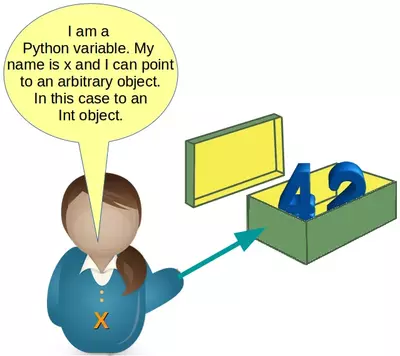
As variables are pointing to objects and objects can be of arbitrary data types, variables cannot have types associated with them. This is a huge difference from C, C++ or Java, where a variable is associated with a fixed data type. This association can't be changed as long as the program is running.
Therefore it is possible to write code like the following in Python:
x = 42
print(x)
OUTPUT:
42
x = "Now x references a string"
print(x)
OUTPUT:
Now x references a string
We want to demonstrate something else now. Let's look at the following code:
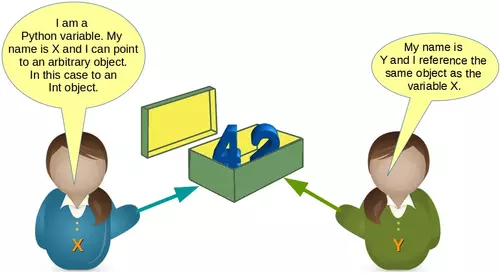
x = 42
y = x
We created an integer object 42 and assigned it to the variable x. After this we assigned x to the variable y. This means that both variables reference the same object. The following picture illustrates this:
What will happen when we execute
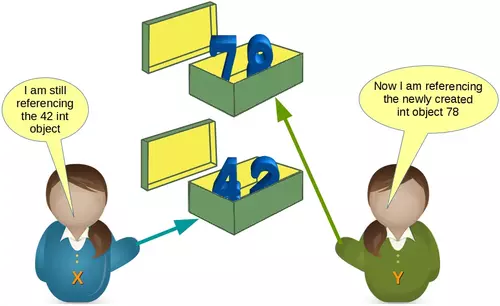
y = 78
after the previous code?
Python will create a new integer object with the content 78 and then the variable y will reference this newly created object, as we can see in the following picture:
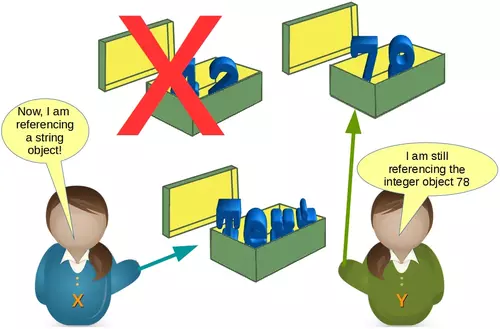
Most probably, we will see further changes to the variables in the flow of our program. There might be, for example, a string assignment to the variable x. The previously integer object "42" will be orphaned after this assignment. It will be removed by Python, because no other variable is referencing it.
You may ask yourself, how can we see or prove that x and y really reference the same object after the assignment y = x of our previous example?
The identity function id() can be used for this purpose. Every instance (object or variable) has an identity, i.e., an integer which is unique within the script or program, i.e., other objects have different identities. So, let's have a look at our previous example and how the identities will change:
x = 42
id(x)
OUTPUT:
140709828470448
y = x
id(x), id(y)
OUTPUT:
(140709828470448, 140709828470448)
y = 78
id(x), id(y)
OUTPUT:
(140709828470448, 140709828471600)
Valid Variable Names
The naming of variables follows the more general concept of an identifier. A Python identifier is a name used to identify a variable, function, class, module or other object.
A variable name and an identifier can consist of the uppercase letters "A" through "Z", the lowercase letters "a" through "z", the underscore _ and, except for the first character, the digits 0 through 9. Python 3.x is based on Unicode. That is, variable names and identifier names can additionally contain Unicode characters as well.
Identifiers are unlimited in length. Case is significant. The fact that identifier names are case-sensitive can cause problems to some Windows users, where file names are case-insensitive, for example.
Exceptions from the rules above are the special Python keywords, as they are described in the following paragraph.
The following variable definitions are all valid:
height = 10
maximum_height = 100
υψος = 10
μεγιστη_υψος = 100
MinimumHeight = 1
Live Python training
Enjoying this page? We offer live Python training courses covering the content of this site.
Upcoming online Courses
See our Python training courses
Python Keywords
No identifier can have the same name as one of the Python keywords, although they are obeying the above naming conventions:
and, as, assert, break, class, continue, def, del, elif, else,
except, False, finally, for, from, global, if, import, in, is,
lambda, None, nonlocal, not, or, pass, raise, return, True, try,
while, with, yield
There is no need to learn them by heart. You can get the list of Python keywords in the interactive shell by using help. You type help() in the interactive, but please don't forget the parenthesis:
help()
Welcome to Python 3.4's help utility!
If this is your first time using Python, you should definitely check out
the tutorial on the Internet at http://docs.python.org/3.4/tutorial/.
Enter the name of any module, keyword, or topic to get help on writing
Python programs and using Python modules.  To quit this help utility and
return to the interpreter, just type "quit".
To get a list of available modules, keywords, symbols, or topics, type
"modules", "keywords", "symbols", or "topics".  Each module also comes
with a one-line summary of what it does; to list the modules whose name
or summary contain a given string such as "spam", type "modules spam".
help>
What you see now is the help prompt, which allows you to query help on lots of things, especially on "keywords" as well:
help> keywords
Here is a list of the Python keywords.  Enter any keyword to get more help.
False               def                 if                  raise
None                del                 import              return
True                elif                in                  try
and                 else                is                  while
as                  except              lambda              with
assert              finally             nonlocal            yield
break               for                 not
class               from                or
continue            global              pass
help>
Naming Conventions
We saw in our chapter on "Valid Variable Names" that we sometimes need names which consist of more than one word. We used, for example, the name "maximum_height". The underscore functioned as a word separator, because blanks are not allowed in variable names. Some people prefer to write variable names in the so-called CamelCase notation. We defined the variable MinimumHeight in this naming style.
There is a permanent "war" going on between the camel case followers and the underscore lovers. Personally, I definitely prefer "the_natural_way_of_naming_things" to "TheNaturalWayOfNamingThings". I think that the first one is more readable and looks more natural language like. In other words: CamelCase words are harder to read than their underscore counterparts, EspeciallyIfTheyAreVeryLong. This is my personal opinion shared by many other programmers but definitely not everybody. The Style Guide for Python Code recommends underscore notation for variable names as well as function names.
Certain names should be avoided for variable names: Never use the characters 'l' (lowercase letter "L"), 'O' ("O" like in "Ontario"), or 'I' (like in "Indiana") as single character variable names. They should be avoided, because these characters are indistinguishable from the numerals one and zero in some fonts. When tempted to use 'l', use 'L' instead, if you cannot think of a better name anyway. The Style Guide has to say the following about the naming of identifiers in standard modules: "All identifiers in the Python standard library MUST use ASCII-only identifiers, and SHOULD use English words wherever feasible (in many cases, abbreviations and technical terms are used which aren't English). In addition, string literals and comments must also be in ASCII. The only exceptions are (a) test cases testing the non-ASCII features, and (b) names of authors. Authors whose names are not based on the latin alphabet MUST provide a latin transliteration of their names."
Companies, institutes, organizations or open source projects aiming at an international audience should adopt a similar notation convention!
Live Python training
Enjoying this page? We offer live Python training courses covering the content of this site.
See our Python training courses
Changing Data Types and Storage Locations
Programming means data processing. Data in a Python program is represented by objects. These objects can be
•built-in, i.e., objects provided by Python,
•objects from extension libraries,
•created in the application by the programmer.
So we have different "kinds" of objects for different data types. We will have a look at the different built-in data types in Python.
Numbers
Python's built-in core data types are in some cases also called object types. There are four built-in data types for numbers:
•Integer
    ∙Normal integers
    e.g., 4321
    ∙Octal literals (base 8)
    A number prefixed by 0o (zero and a lowercase "o" or uppercase "O") will be interpreted as an octal number
    example:
a = 0o10
print(a)
OUTPUT:
8
    ∙Hexadecimal literals (base 16)
    Hexadecimal literals have to be prefixed either by "0x" or "0X".
    example:
hex_number = 0xA0F
print(hex_number)
OUTPUT:
2575
    ∙Binary literals (base 2)
    Binary literals can easily be written as well. They have to be prefixed by a leading "0", followed by a "b" or "B":
x = 0b101010
x
OUTPUT:
42
The functions hex, bin, oct can be used to convert an integer number into the corresponding string representation of the integer number:
x = hex(19)
x
OUTPUT:
'0x13'
type(x)
OUTPUT:
str
x = bin(65)
x
OUTPUT:
'0b1000001'
x = oct(65)
x
OUTPUT:
'0o101'
oct(0b101101)
OUTPUT:
'0o55'
Integers in Python3 can be of unlimited size
x = 787366098712738903245678234782358292837498729182728
print(x)
OUTPUT:
787366098712738903245678234782358292837498729182728
x * x * x
OUTPUT:
488123970070638215986770162105731315538827586091948617997871122950228891123960901918308618286311523282239313708275589787123005317148968569797875581092352
•Long integers
Python 2 has two integer types: int and long. There is no "long int" in Python3 anymore. There is only one "int" type, which contains both "int" and "long" from Python2. That's why the following code fails in Python 3:
    1L
  File "<stdin>", line 1
    1L
     ^
OUTPUT:
  File "<ipython-input-27-315518d611d8>", line 1
    1L
     ^
SyntaxError: invalid syntax
x = 43
long(x)
OUTPUT:
---------------------------------------------------------------------------
NameError                                 Traceback (most recent call last)
<ipython-input-49-bad7871d6042> in <module>
      1 x = 43
----> 2long(x)
NameError: name 'long' is not defined
•Floating-point numbers
For example: 42.11, 3.1415e-10
•Complex numbers
Complex numbers are written as
<real part> + <imaginary part>
Examples:
x = 3 + 4j
y = 2 - 3j
z = x + y
print(z)
OUTPUT:
(5+1j)
Live Python training
Enjoying this page? We offer live Python training courses covering the content of this site.
See our Python training courses
Integer Division
There are two kinds of division operators:
•"true division" performed by "/"
•"floor division" performed by "//"
True Division
True division uses the slash (/) character as the operator sign. Most probably it is what you expect "division" to be. The following examples are hopefully self-explanatory:
10 / 3
OUTPUT:
3.3333333333333335
10.0 / 3.0
OUTPUT:
3.3333333333333335
10.5 / 3.5
OUTPUT:
3.0
Floor Division
The operator "//" performs floor division, i.e., the dividend is divided by the divisor - like in true division - but the floor of the result will be returned. The floor is the largest integer number smaller than the result of the true division. This number will be turned into a float, if either the dividend or the divisor or both are float values. If both are integers, the result will be an integer as well. In other words, "//" always truncates towards negative infinity.
Connection to the floor function: In mathematics and computer science, the floor function is the function that takes as input a real number x and returns the greatest integer floor ( x ) = ⌊ x ⌋ that is less than or equal to x.
If you are confused now by this rather mathematical and theoretical definition, the following examples will hopefully clarifiy the matter:
9 // 3
OUTPUT:
3
10 // 3
OUTPUT:
3
11 // 3
OUTPUT:
3
12 // 3
OUTPUT:
4
10.0 // 3
OUTPUT:
3.0
-7 // 3
OUTPUT:
-3
-7.0 // 3
OUTPUT:
-3.0
Strings
The task of the first-generation computers in the forties and fifties had been - due to technical restraints - focused on number processing. Text processing had been just a dream at that time. Nowadays, one of the main tasks of computers is text processing in all its varieties; the most prominent applications are search engines like Google. To enable text processing programming languages need suitable data types. Strings are used in all modern programming languages to store and process textual information. Logically, a string - like any text - is a sequence of characters. The question remains what a character consists of. In a book, or in a text like the one your are reading now, characters consist of graphical shapes, so-called graphemes, consisting of lines, curves and crossings in certain angles or positions and so on. The ancient Greeks associated the word with the engravings on coins or the stamps on seals.

In computer science or computer technology, a character is a unit of information. These characters correspond to graphemes, the fundamental units of written or printed language. Before Unicode came into usage, there was a one to one relationship between bytes and characters, i.e., every character - of a national variant, i.e. not all the characters of the world - was represented by a single byte. Such a character byte represents the logical concept of this character and the class of graphemes of this character. The image above depicts various representations of the letter "A", i.e., "A" in different fonts. So in printing there are various graphical representations or different "encodings" of the abstract concept of the letter A. (By the way, the letter "A" can be ascribed to an Egyptian hieroglyph with a pictogram of an ox.) All of these graphical representations have certain features in common. In other words, the meaning of a character or a written or printed text doesn't depend on the font or writing style used. On a computer the capital A is encoded in binary form. If we use ASCII it is encoded - like all the other characters - as the byte 65.
ASCII is restricted to 128 characters and "Extended ASCII" is is still limited to 256 bytes or characters. This is good enough for languages like English, German and French, but by far not sufficient for Chinese, Japanese and Korean. That's where Unicode gets into the game. Unicode is a standard designed to represent every character from every language, i.e., it can handle any text of the world's writing systems. These writing systems can also be used simultaneously, i.e., Roman alphabet mixed with Cyrillic or even Chinese characters.
There is a different story about Unicode. A character maps to a code point. A code point is a theoretical concept. That is, for example, that the character "A" is assigned a code point U+0041. The "U+" means "Unicode" and the "0041" is a hexadecimal number, 65 in decimal notation.
You can transform it like this in Python:
hex(65)
OUTPUT:
'0x41'
int(0x41)
OUTPUT:
65
Up to four bytes are possible per character in Unicode. Theoretically, this means a huge number of 4294967296 possible characters. Due to restrictions from UTF-16 encoding, there are "only" 1,112,064 characters possible. Unicode version 8.0 has assigned 120,737 characters. This means that there are slightly more than 10 % of all possible characters assigned, in other words, we can still add nearly a million characters to Unicode.
Live Python training
Enjoying this page? We offer live Python training courses covering the content of this site.
See our Python training courses
Unicode Encodings
| Name | Description |
|---|---|
| UTF-32 | It's a one to one encoding, i.e., it takes each Unicode character (a 4-byte number) and stores it in 4 bytes. One advantage of this encoding is that you can find the Nth character of a string in linear time, because the Nth character starts at the 4×Nth byte. A serious disadvantage of this approach is due to the fact that it needs four bytes for every character. |
| UTF-16 | UTF-16 (16-bit Unicode Transformation Format) is a character encoding capable of encoding all 1,112,064 valid code points of Unicode. The encoding is variable-length, as code points are encoded with one or two 16-bit code units. |
| UTF-8 | UTF8 is a variable-length encoding system for Unicode, i.e., different characters take up a different number of bytes. ASCII characters use solely one byte per character. This means that the first 128 characters UTF-8 are indistinguishable from ASCII. But the so-called "Extended Latin" characters like the Umlaute ä, ö and so on take up two bytes. Chinese characters need three bytes. Finally, the very seldom used characters of the "astral plane" need four bytes to be encoded in UTF-8. W3Techs (Web Technology Surveys) writes that "UTF-8 is used by 94.3% of all the websites whose character encoding we know." |
String, Unicode and Python
After this lengthy but necessary introduction, we finally come to Python and the way it deals with strings. All strings in Python 3 are sequences of "pure" Unicode characters, no specific encoding like UTF-8.
There are different ways to define strings in Python:
s = 'I am a string enclosed in single quotes.'
s2 = "I am another string, but I am enclosed in double quotes."
Both s and s2 of the previous example are variables referencing string objects. We can see that string literals can either be enclosed in matching single (') or in double quotes ("). Single quotes will have to be escaped with a backslash \, if the string is defined with single quotes:
s3 = 'It doesn\'t matter!'
This is not necessary, if the string is represented by double quotes:
s3 = "It doesn't matter!"
Analogously, we will have to escape a double quote inside a double quoted string:
txt = "He said: \"It doesn't matter, if you enclose a string in single or double quotes!\""
print(txt)
OUTPUT:
He said: "It doesn't matter, if you enclose a string in single or double quotes!"
They can also be enclosed in matching groups of three single or double quotes. In this case they are called triple-quoted strings. The backslash () character is used to escape characters that otherwise have a special meaning, such as newline, backslash itself, or the quote character.
txt = '''A string in triple quotes can extend
over multiple lines like this one, and can contain
'single' and "double" quotes.'''
In triple-quoted strings, unescaped newlines and quotes are allowed (and are retained), except that three unescaped quotes in a row terminate the string. (A "quote" is the character used to open the string, i.e., either ' or ".)

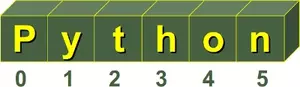
A string in Python consists of a series or sequence of characters - letters, numbers, and special characters. Strings can be subscripted or indexed. Similar to C, the first character of a string has the index 0.
s = "Hello World"
s[0]
OUTPUT:
'H'
s[5]
OUTPUT:
' '
The last character of a string can be accessed this way:
s[len(s)-1]
OUTPUT:
'd'
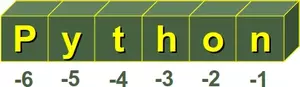
Yet, there is an easier way in Python. The last character can be accessed with -1, the second to last with -2 and so on:
s[-1]
OUTPUT:
'd'
s[-2]
OUTPUT:
'l'
Some readers might find it confusing when we use "to subscript" as a synonym for "to index". Usually, a subscript is a number, figure, symbol, or indicator that is smaller than the normal line of type and is set slightly below or above it. When we wrote s[0] or s[3] in the previous examples, this can be seen as an alternative way for the notation s0 or s3. So, both s3 and s[3] describe or denote the 4th character. By the way, there is no character type in Python. A character is simply a string of size one.
It's possible to start counting the indices from the right, as we have mentioned previously. In this case negative numbers are used, starting with -1 for the most right character.
Some operators and functions for strings
•Concatenation
Strings can be glued together (concatenated) with the + operator: "Hello" + "World" will result in "HelloWorld"
•Repetition
String can be repeated or repeatedly concatenated with the asterisk operator "": "-" 3 will result in "---"
•Indexing
"Python"[0] will result in "P"
•Slicing
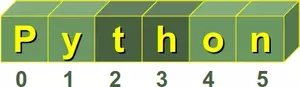
Substrings can be created with the slice or slicing notation, i.e., two indices in square brackets separated by a colon: "Python"[2:4] will result in "th"
•Size
len("Python") will result in 6
Live Python training
Enjoying this page? We offer live Python training courses covering the content of this site.
See our Python training courses
Immutable Strings
Like strings in Java and unlike C or C++, Python strings cannot be changed. Trying to change an indexed position will raise an error:
s = "Some things are immutable!"
s[-1] = "."
OUTPUT:
---------------------------------------------------------------------------
TypeError                                 Traceback (most recent call last)
<ipython-input-53-2fa9c6f1b317> in <module>
      1 s = "Some things are immutable!"
----> 2s[-1] = "."
TypeError: 'str' object does not support item assignment
Beginners in Python are often confused, when they see the following codelines:
txt = "He lives in Berlin!"
txt = "He lives in Hamburg!"
The variable "txt" is a reference to a string object. We define a completely new string object in the second assignment. So, you shouldn't confuse the variable name with the referenced object!
A String Peculiarity
Strings show a special effect, which we will illustrate in the following example. We will need the "is"-Operator. If both a and b are strings, "a is b" checks if they have the same identity, i.e., share the same memory location. If "a is b" is True, then it trivially follows that "a == b" has to be True as well. Yet, "a == b" True doesn't imply that "a is b" is True as well!
Let's have a look at how strings are stored in Python:
a = "Linux"
b = "Linux"
a is b
OUTPUT:
True
Okay, but what happens, if the strings are longer? We use the longest village name in the world in the following example. It's a small village with about 3000 inhabitants in the South of the island of Anglesey in the North-West of Wales:
a = "Llanfairpwllgwyngyllgogerychwyrndrobwllllantysiliogogogoch"
b = "Llanfairpwllgwyngyllgogerychwyrndrobwllllantysiliogogogoch"
a is b
OUTPUT:
True
Nothing has changed in our first "Linux" example. But what works for Wales doesn't work e.g., for Baden-Württemberg in Germany:
a = "Baden-Württemberg"
b = "Baden-Württemberg"
a is b
OUTPUT:
False
a == b
OUTPUT:
True
You are right, it has nothing to do with geographical places. The special character, i.e., the hyphen, is to "blame".
a = "Baden!"
b = "Baden!"
a is b
OUTPUT:
False
a = "Baden1"
b = "Baden1"
a is b
OUTPUT:
True
Live Python training
Enjoying this page? We offer live Python training courses covering the content of this site.
See our Python training courses
Escape Sequences in Strings
To end our coverage of strings in this chapter, we will introduce some escape characters and sequences. The backslash () character is used to escape characters, i.e., to "escape" the special meaning, which this character would otherwise have. Examples for such characters are newline, backslash itself, or the quote character. String literals may optionally be prefixed with a letter 'r' or 'R'; these strings are called raw strings. Raw strings use different rules for interpreting backslash escape sequences.
| Escape Sequence | Meaning |
|---|---|
| \newline | Ignored |
| \\ | Backslash (\) |
| \' | Single quote (') |
| \" | Double quote (") |
| \a | ASCII Bell (BEL) |
| \b | ASCII Backspace(BS) |
| \f | ASCII Formfeed (FF) |
| \n | ASCII Linefeed (LF) |
| \N{name} | Character named name in the Unicode database (Unicode only) |
| \r | ASCII Carriage Return (CR) |
| \t | ASCII Horizontal Tab (TAB) |
| \uxxxx | Character with 16-bit hex value xxxx (Unicode only) |
| \Uxxxxxxxx | Character with 32-bit hex value xxxxxxxx (Unicode only) |
| \v | ASCII Vertical Tab (VT) |
| \ooo | Character with octal value ooo |
| \xhh | Character with hex value hh |
Byte Strings
Python 3.0 uses the concepts of text and (binary) data instead of Unicode strings and 8-bit strings. Every string or text in Python 3 is Unicode, but encoded Unicode is represented as binary data. The type used to hold text is str, the type used to hold data is bytes. It's not possible to mix text and data in Python 3; it will raise TypeError. While a string object holds a sequence of characters (in Unicode), a bytes object holds a sequence of bytes, out of the range 0 to 255, representing the ASCII values. Defining bytes objects and casting them into strings:
x = "Hallo"
t = str(x)
u = t.encode("UTF-8")
print(u)
OUTPUT:
b'Hallo'
Live Python training
Enjoying this page? We offer live Python training courses covering the content of this site.
Upcoming online Courses
See our Python training courses