3. Execute a Script
By Bernd Klein. Last modified: 01 Feb 2022.
So far we have played around with Python commands in the Python shell. We want to write now our first serious Python program. You will hardly find any beginner's textbook on programming, which doesn't start with the "almost mandatory" "Hello World" program, i.e. a program which prints the string "Hello World". We start a Python interactive shell in a terminal with the command "python". It might be necessary to use "python3" to get a Python3 shell:
$ python3
(base) bernd@moon:~$ python
Python 3.7.1 (default, Dec 14 2018, 19:28:38)
[GCC 7.3.0] :: Anaconda, Inc. on linux
Type "help", "copyright", "credits" or "license" for more information.
>>> print("Hello World!")
Hello World!
>>>
But, as we said at the beginning, we want to write a "serious" program now, i.e. a program which resides in a file. This way, we can use a program over and over again without having to type it in again. Some may like to call such a little program "script". We will use a slight variation of the "Hello World" theme. We have to include our print function into a file. To save and edit our program in a file we need an editor. There are lots of editors, but you should choose one, which supports syntax highlighting and indentation. For Linux you can use vi, vim, emacs, geany, gedit and umpteen others. The Emacs works for Windows as well, but Notepad++ may be the better choice in many cases. Of course, you can also use an IDE (Integrated Development Environment) like PyCharm or Spyder for this purpose.
So, after you have found the editor or the IDE of your choice, you are ready to develop your mini program, i.e.
print("My first simple Python script!")
OUTPUT:
My first simple Python script!
and save it as my_first_simple_program.py. The suffix .py is not really necessary for Linux but it's good to use it since the extension is essential, if you want to write modules.
Start a Python program
Let's assume our script is in a subdirectory under the home directory of the user monty:
monty@python:~$ cd python
monty@python:~/python$ python my_first_simple_program.py
My first simple Python script!
monty@python:~/python$
It can be started in a Command Prompt in Windows as well (start -> All Programs -> Accessories -> Command Prompt). You may notice that we called our little program "hello.py" and not my_first_simple_program.py:

Live Python training

Enjoying this page? We offer live Python training courses covering the content of this site.
See our Python training courses
Starting a Python Script under Windows
Python Internals
Most probably you have read somewhere that the Python language is an interpreted programming or a script language. The truth is: Python is both an interpreted and a compiled language. But calling Python a compiled language would be misleading. (At the end of this chapter, you will find the definitions for Compilers and Interpreters, in case you are not already familiar with the concepts!) People would assume that the compiler translates the Python code into machine language. Python code is translated into intermediate code, which has to be executed by a virtual machine, known as the PVM, the Python Virtual Machine. This is a similar approach to the one taken by Java. There is even a way of translating Python programs into Java byte code for the Java Virtual Machine (JVM). This can be achieved with Jython.
The question is, do I have to compile my Python scripts to make them faster or how can I compile them? The answer is easy: normally, you don't need to do anything and you shouldn't bother, because "Python" is already doing the thinking for you, i.e. it takes the necessary steps automatically.
For whatever reason you want to compile a python program manually? No problem. It can be done with the module py_compile, either using the interpreter shell
import py_compile
py_compile.compile('my_first_simple_program.py')
OUTPUT:
'__pycache__/my_first_simple_program.cpython-37.pyc'
or using the following command at the shell prompt
python -m py_compile my_first_simple_program.py
Either way, you may notice two things: first, there will be a new subdirectory "__pycache__", if it doesn't already exist. You will find a file "my_first_simple_script.cpython-34.pyc" in this subdirectory. This is the compiled version of our file in byte code.
You can also automatically compile all Python files using the compileall module. You can do it from the shell prompt by running compileall.py and providing the path of the directory containing the Python files to compile:
monty@python:~/python$ python -m compileall .
Listing . ...
But as we have said, you don't have to and shouldn't bother about compiling Python code. The compilation is hidden from the user for a good reason. Some newbies wonder sometimes where these ominous files with the .pyc suffix might come from. If Python has write-access for the directory where the Python program resides, it will store the compiled byte code in a file that ends with a .pyc suffix. If Python has no write access, the program will work anyway. The byte code will be produced but discarded when the program exits. Whenever a Python program is called, Python will check, if a compiled version with the .pyc suffix exists. This file has to be newer than the file with the .py suffix. If such a file exists, Python will load the byte code, which will speed up the start up time of the script. If there is no byte code version, Python will create the byte code before it starts the execution of the program. Execution of a Python program means execution of the byte code on the Python.
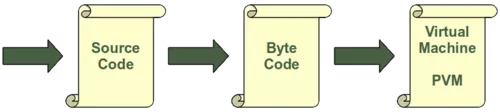
Virtual Machine (PVM).
Compilation of a Python script
Every time a Python script is executed, a byte code is created. If a Python script is imported as a module, the byte code will be stored in the corresponding .pyc file. So, the following will not create a byte code file:
monty@python:~/python$ python my_first_simple_program.py
My first simple Python script!
monty@python:~/python$
The import in the following Python2 session will create a byte code file with the name "my_first_simple_program.pyc":
monty@python:~/tmp$ ls
my_first_simple_program.py
monty@python:~/tmp$ python
Python 2.6.5 (r265:79063, Apr 16 2010, 13:57:41)
[GCC 4.4.3] on linux2
Type "help", "copyright", "credits" or "license" for more information.
>>> import my_first_simple_script
My first simple Python script!
>>> exit()
monty@python:~/tmp$ ls
my_first_simple_program.py  my_first_simple_program.pyc
monty@python:~/tmp$
Live Python training
Enjoying this page? We offer live Python training courses covering the content of this site.
Upcoming online Courses
See our Python training courses
Runnable scripts under Linux
This chapter can be skipped by Windows users. Don't worry! It is not essential!
So far, we have started our Python scripts with
python3 my_file.py
on the bash command line. A Python script can also be started like any other script under Linux, e.g. Bash scripts. Two steps are necessary for this purpose: the shebang line #!/usr/bin/env python3 has to be added as the first line of your Python code file. Alternatively, this line can be #!/usr/bin/python3, if this is the location of your Python interpreter. Instead using env as in the first shebang line, the interpreter is searched for and located at the time the script is run. This makes the script more portable. Yet, it also suffers from the same problem: The path to env may also be different on a per-machine basis. The file has to be made executable: The command "chmod +x scriptname" has to be executed on a Linux shell, e.g. bash. "chmod 755 scriptname" can also be used to make your file executable. In our example:
$ chmod +x my_first_simple_program.py
We illustrate this in a bash session:
bernd@marvin:~$ more my_first_simple_script.py
#!/usr/bin/env python3
print("My first simple Python script!")
bernd@marvin:~$ ls -ltr my_first_simple_script.py
-rw-r--r-- 1 bernd bernd 63 Nov  4 21:17 my_first_simple_script.py
bernd@marvin:~$ chmod +x my_first_simple_script.py
bernd@marvin:~$ ls -ltr my_first_simple_script.py
-rwxr-xr-x 1 bernd bernd 63 Nov  4 21:17 my_first_simple_script.py
bernd@marvin:~$ ./my_first_simple_script.py
My first simple Python script!
Differences between Compilers and Interpreters
Compiler
Definition: a compiler is a computer program that transforms (translates) source code of a programming language (the source language) into another computer language (the target language). In most cases compilers are used to transform source code into executable program, i.e. they translate code from high-level programming languages into low (or lower) level languages, mostly assembly or machine code.
Interpreter
Definition: an interpreter is a computer program that executes instructions written in a programming language. It can either execute the source code directly or translate the source code in a first step into a more efficient representation and execute this code.
Live Python training
Enjoying this page? We offer live Python training courses covering the content of this site.
Upcoming online Courses
See our Python training courses