11. Shallow and Deep Copy
By Bernd Klein. Last modified: 29 Jun 2022.
Introduction

In this chapter, we will cover the question of how to copy lists and nested lists. The problems which we will encounter are general problems of mutable data types. Trying to copy lists can be a stumping experience for newbies. But before, we would like to summarize some insights from the previous chapter "Data Types and Variables". Python even shows a strange behaviour for the beginners of the language - in comparison with some other traditional programming languages - when assigning and copying simple data types like integers and strings. The difference between shallow and deep copying is only relevant for compound objects, i.e. objects containing other objects, like lists or class instances.
In the following code snippet, y points to the same memory location as X. We can see this by applying the id() function on x and y. However, unlike "real" pointers like those in C and C++, things change, when we assign a new value to y. In this case y will receive a separate memory location, as we have seen in the chapter "Data Types and Variables" and can see in the following example:
x = 3
y = x
print(id(x), id(y))
OUTPUT:
94400598764928 94400598764928
y = 4
print(id(x), id(y))
OUTPUT:
94400598764928 94400598764960
print(x,y)
OUTPUT:
3 4
But even if this internal behaviour appears strange compared to programming languages like C, C++, Perl or Java, the observable results of the previous assignments are what we exprected, i.e. if you do not look at the id values. However, it can be problematic, if we copy mutable objects like lists and dictionaries.
Python creates only real copies, if it has to, i.e. if the user, the programmer, explicitly demands it.
We will introduce you to the most crucial problems, which can occur when copying mutable objects such as lists and dictionaries.
Live Python training

Enjoying this page? We offer live Python training courses covering the content of this site.
See our Python training courses
Variables Sharing an Object
You are on this page to learn about copying objects, especially lists. Nevertheless, you need to exercise patience. We want to show something that looks like a copy to many beginners but has nothing to do with copies.
colours1 = ["red", "blue"]
colours2 = colours1
print(colours1, colours2)
OUTPUT:
['red', 'blue'] ['red', 'blue']
Both variables reference the same list object. If we look at the identities of the variables colours1 and colours2, we can see that both are references to the same object:
print(id(colours1), id(colours2))
OUTPUT:
140240131388864 140240131388864
In the example above a simple list is assigned to colours1. This list is a so-called "shallow list", because it doesn't have a nested structure, i.e. no sublists are contained in the list. In the next step we assign colours1 to colours2.
The id() function shows us that both variables point at the same list object, i.e. they share this object.

We have two variable names colours1 and colours2, which we have depicted as yellow ovals. The blue box symbolizes the list object. A list object consists of references to other objects. In our example the list object, which is referenced by both variables, references two string objects, i.e. "red" and "blue".
Now we have to examine, what will happen, if we change just one element of the list of colours2 or colours1.
Now we want to see, what happens, if we assign a new object to colours2. As expected, the values of colours1 remain unchanged. Like it was in our example in the chapter "Data Types and Variables", a new memory location had been allocated for colours2, as we have assigned a completely new list, i.e. a new list object to this variable.
colours1 = ["red", "blue"]
colours2 = colours1
print(id(colours1), id(colours2))
OUTPUT:
140240083245056 140240083245056
colours2 = "green"
print(colours1)
OUTPUT:
['red', 'blue']
print(colours1)
OUTPUT:
['red', 'blue']
print(colours2)
OUTPUT:
green
We assigned a new object to the variable 'colours2'. In the following code, we will change the list object internally by assigning a new value to the second element of the list.
colours1 = ["red", "blue"]
colours2 = colours1

colours2[1] = "green"
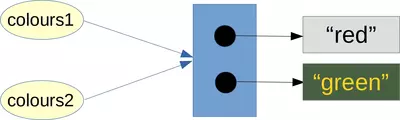
Let's see, what has happened in detail in the previous code. We assigned a new value to the second element of colours2, i.e. the element with the index 1. Lots of beginners will be surprised as the list of colours1 has been "automatically" changed as well. Of course, we don't have two lists: We have only two names for the same list!
The explanation is that we didn't assign a new object to the variable colours2. We changed the object referenced by colours2 internally or as it is usually called "in-place". Both variables colours1 and colours2 still point to the same list object.
Copying Lists
We have finally arrived at the topic of copying lists. The list class offers the method copy for this purpose. Even though the name seems to be clear, this path also has a catch.
The catch can be seen, if we use help on copy:
help(list.copy)
OUTPUT:
Help on method_descriptor:

copy(self, /)
    Return a shallow copy of the list.
Many beginners overlook the word "shallow" here. help tells us that a new list will be created by the copy method. This new list will be a 'shallow' copy of the original list.
In principle, the word "shallow" is unnecessary or even misleading in this definition.
First you should remember what a list is in Python. A list in Python is an object consisting of an ordered sequence of references to Python objects. The following is a list of strings:
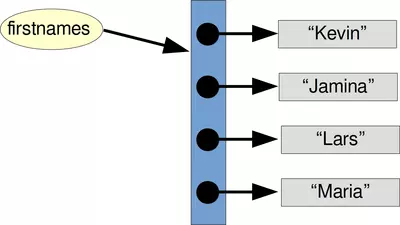
The list which the variable firstnames is referencing is a list of strings. Basically, the list object is solely the blue box with the arrows, i.e. the references to the strings. The strings itself are not part of the list.
firstnames = ['Kevin', 'Jamina', 'Lars', 'Maria']
The previous example the list of first names firstnames is homogeneous, i.e. it consists only of strings, so all elements have the same data type. But you should be aware of the fact that the references of a list can refer to any objects. The following list whatever is such a more general list:
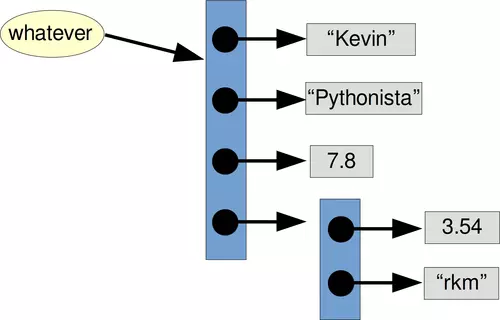
whatever = ["Kevin", "Pythonista", 7.8, [3.54, "rkm"]]
When a list is copied, we copy the references. In our examples, these are the blue boxes referenced by firstnames and by whatever. The implications of this are shown in the following subchapter.
Live Python training
Enjoying this page? We offer live Python training courses covering the content of this site.
Upcoming online Courses
See our Python training courses
Problems of Copying Lists
Copying lists can easily be misunderstood, and this misconception can lead to unpleasant errors. We will present this in the form of a slightly different love story.

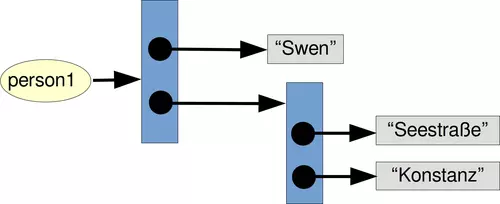
Imagine a person living in the city of Constance. The city is located in the South of Germany at the banks of Lake Constance (Bodensee in German). The river Rhine, which starts in the Swiss Alps, passes through Lake Constance and leaves it, considerably larger. This person called Swen lives in "Seestrasse", one of the most expensive streets of Constance. His apartment has a direct view of the lake and the city of Constance. We put some information about Swen in the following list structure:
person1 = ["Swen", ["Seestrasse", "Konstanz"]]
One beautiful day, the good-looking Sarah meets Swen, her Prince Charming. To cut the story short: Love at first sight and she moves in with Swen.
Now it is up to us to create a data set for Sarah. We are lazy and we will recycle Swen's data, because she will live now with him in the same apartment.
We will copy Swen's data and change the name to Sarah:
person2 = person1.copy()
person2[0] = "Sarah"
print(person2)
OUTPUT:
['Sarah', ['Seestrasse', 'Konstanz']]
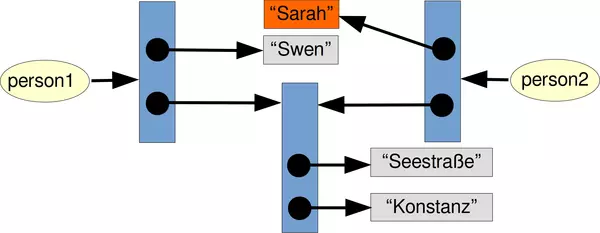
They live in perfect harmony and deep love for a long time, let's say a whole weekend. She suddenly realizes that Swen is a monster: He stains the butter with marmelade and honey and even worse, he spreads out his worn socks in the bedroom. It doesn't take long for her to make a crucial decision: She will leave him and the dream apartment.
She moves into a street called Bücklestrasse. A residential area that is nowhere near as nice, but at least she is away from the monster.
How can we arrange this move from the Python point of view?
The street can be accessed with person2[1][0]. So we set this to the new location:
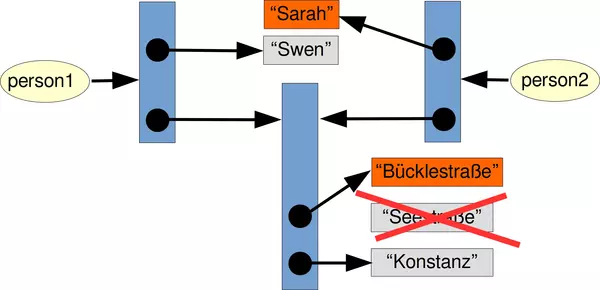
person2[1][0] = "Bücklestraße"
We can see that Sarah successfully moved to the new location:
print(person2)
OUTPUT:
['Sarah', ['Bücklestraße', 'Konstanz']]
Is this the end of our story? Will she never see Swen again? Let's check Swen's data:
print(person1)
OUTPUT:
['Swen', ['Bücklestraße', 'Konstanz']]
Swen is clingy. She cannot get rid of him! This might be quite surprising for some. Why is it like this? The list person1 consists of two references: One to a string object ("Swen") and the other one to nested list (the address ['Seestrasse', 'Konstanz']. When we used copy, we copied only these references. This means that both person1[1] and person2[1] reference the same list object. When we change this nested list, it is visible in both lists.
deepcopy from the Module copy
A solution to the described problem is provided by the module copy. This module provides the method "deepcopy", which allows a complete or deep copy of an arbitrary list, i.e. shallow and other lists.
Let us redo the previous example with the function deepcopy:
from copy import deepcopy
person1 = ["Swen", ["Seestrasse", "Konstanz"]]

person2 = deepcopy(person1)
After this the implementation structure looks like this:
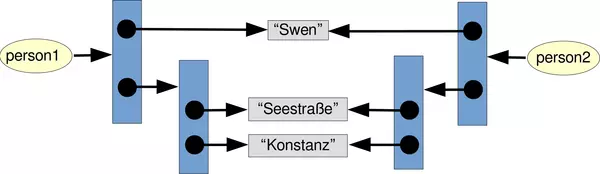
We can see that the nested list with the address was copied as well.
We can see by using the id function that the sublists have been copied, because id(person1[1]) is different from id(person2[1]).
print(id(person1[1]), id(person2[1]))
OUTPUT:
140240082939456 140240082939712
An interesting fact is that the strings are not copied We can see this if we look for example at the names person1[0] and person2[0]. They reference the same string.
print(id(person1[0]), id(person2[0]))
OUTPUT:
140240083474992 140240083474992
We copied the whole data from Swen. So the name of person2 is still Sarah. We have to change it to Sarah:
person2[0] = "Sarah"
Now it looks like this internally, i.e. Sarah and Swen live together:
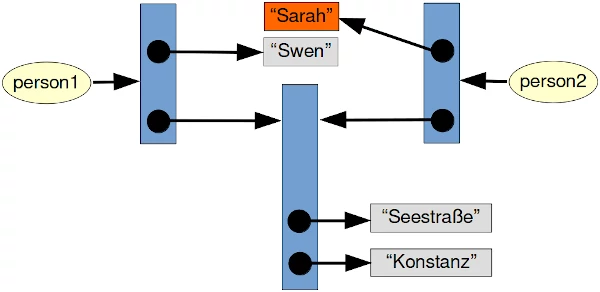
Since Sarah has moved in, we are now well prepared for her escape-like move.
Now, it's time for Sara to move out:
person2[1][0] = "Bücklestrasse"
She successfully moved out and left Swen for good, as we can see in the following:
print(person1, person2)
OUTPUT:
['Swen', ['Seestrasse', 'Konstanz']] ['Sarah', ['Bücklestrasse', 'Konstanz']]
For the sake of clarity, we also provide a diagram which includes all the changes we did after deepcopy:

Live Python training
Enjoying this page? We offer live Python training courses covering the content of this site.
Upcoming online Courses
See our Python training courses